

When buying a CNC machine, most users look first at the machine’s travels, spindle speed and motor power. Yet one of the most critical components that determines what the machine can really do is the CNC control unit. Put two different controls — or the same control with different software options — on the same mechanical structure and you effectively get two different machines in terms of cycle time and surface quality.
This guide continues our machine-investment series. We covered how to make the investment decision around the job itself in Part 1: Let the Job Talk, Not the Price, and the mechanical choices — guideways, spindle, bearings — in Part 2: Box Way or Linear?. Here we focus on the brain of the machine: FANUC, Mitsubishi, Siemens SINUMERIK, HEIDENHAIN, Mazak MAZATROL, Okuma OSP, Haas, Hurco, Fagor, GSK, Syntec and LNC.
There Is No Single Answer to “Which CNC Control Is Best?”
Let’s state it up front: you cannot choose a control unit without knowing what the machine will produce. Putting a top-tier 5-axis control on a VMC that will rough simple 3-axis parts may bring no benefit at all. Conversely, putting a low-spec control on a machine that will cut dies and molds will seriously limit the machine’s real capability.
The second critical point: two models of the same brand — even two packages of the same model — are not the same machine. “It has FANUC on it” is not enough information for a purchase decision. FANUC 0i-MF Plus and FANUC 30i-B Plus are not in the same class; Mitsubishi M80 TypeA and M80 TypeB do not offer the same capacity; Siemens 828D and SINUMERIK ONE target different machine classes. So the right question to ask the dealer is not “Is the control FANUC?” but “Which FANUC model, and which software options are active?”
What Does Control “Speed” Actually Mean?
CNC control performance cannot be measured by blocks-per-second alone. Reading a 200,000-line CAM program very fast is one thing; machining it at high feed without leaving witness marks on the surface is another. Especially in die/mold and free-form surface machining, these components work together:
- Look-ahead: the control analyses upcoming NC blocks in advance and builds acceleration/deceleration profiles without collapsing the feed rate.
- Contour smoothing: turns thousands of tiny G01 moves from CAM into a path the mechanics can actually follow fluidly.
- Jerk control: suppresses sudden acceleration changes on the axes, reducing vibration and surface marks.
- Acc/dec optimization: prevents the servo system from slowing down unnecessarily at sharp direction changes.
- Spline/NURBS interpolation: smooths the toolpath with polynomial curves for more fluid execution.
- Servo loop synchronization: the servo system must actually be able to follow the path the control computes. A fast data stream fed into a slow servo loop causes feed-rate oscillation and visible lines on the workpiece surface.
That is why two different CNCs running the same CAM program can produce different cycle times and different surface finishes. Manufacturers answer this problem with their own algorithm families: AI Contour Control and Fine Surface on FANUC, SSS (Super Smooth Surface) on Mitsubishi, Advanced Surface / Top Surface on Siemens, ADP (Advanced Dynamic Prediction) on HEIDENHAIN, HSSA on Fagor, UltiMotion on Hurco. These are different solutions to the same problem — not the same algorithm.
FANUC: Look at the Option List, Not Just the Model Name
FANUC is one of the most widespread CNC control families in the world, used everywhere from lathes and mills to transfer lines and multi-axis machining centers. Its strongest points are hardware reliability, low failure rates, a standardized G-code structure, strong resale value and the ease of finding operators. We covered FANUC panel and screen layouts in detail in What Is a FANUC CNC Control Unit?.
The FANUC 0i-F Plus Family

For standard three–four axis machining centers, 0i-MF Plus (milling) and 0i-TF Plus (turning) are the common solutions. According to official FANUC data, 0i-MF Plus can support up to 11 controlled axes in total, 9 axes per path, 4 simultaneously controlled axes and 2 paths, plus functions such as Fine Surface Technology, AI Advanced Preview, AI Contour Control, Nano Interpolation, Tilted Working Plane and Tool Center Point control.
The critical phrase is “can support”. A machine labeled 0i-MF Plus does not necessarily have all of these active. A standard 0i-MF Plus typically ships with around 400 blocks of look-ahead, while die/mold-oriented ADV Mill style packages raise look-ahead to around 1500 blocks and upgrade memory, screen and the servo side. Even within the same model name, packages differ significantly.
Why FANUC 30i-B Plus Is Another Class
The high-end 30i-B Plus scales up to 96 controlled axes in total, 15 paths and 24 simultaneous axes per path, and supports advanced functions such as smooth simultaneous 5-axis, Nano Smoothing, volumetric error compensation and 3D interference check. Twin-turret, twin-spindle, transfer and complex multi-channel mill-turn machines are its target. Comparing 0i and 30i families just because “both are Fanuc” is simply wrong. If you want to dig into the FANUC parameter world, start with our FANUC Series 0/00/0-Mate Parameter Reference.
Mitsubishi CNC: Even M80 TypeA and TypeB Are Not the Same
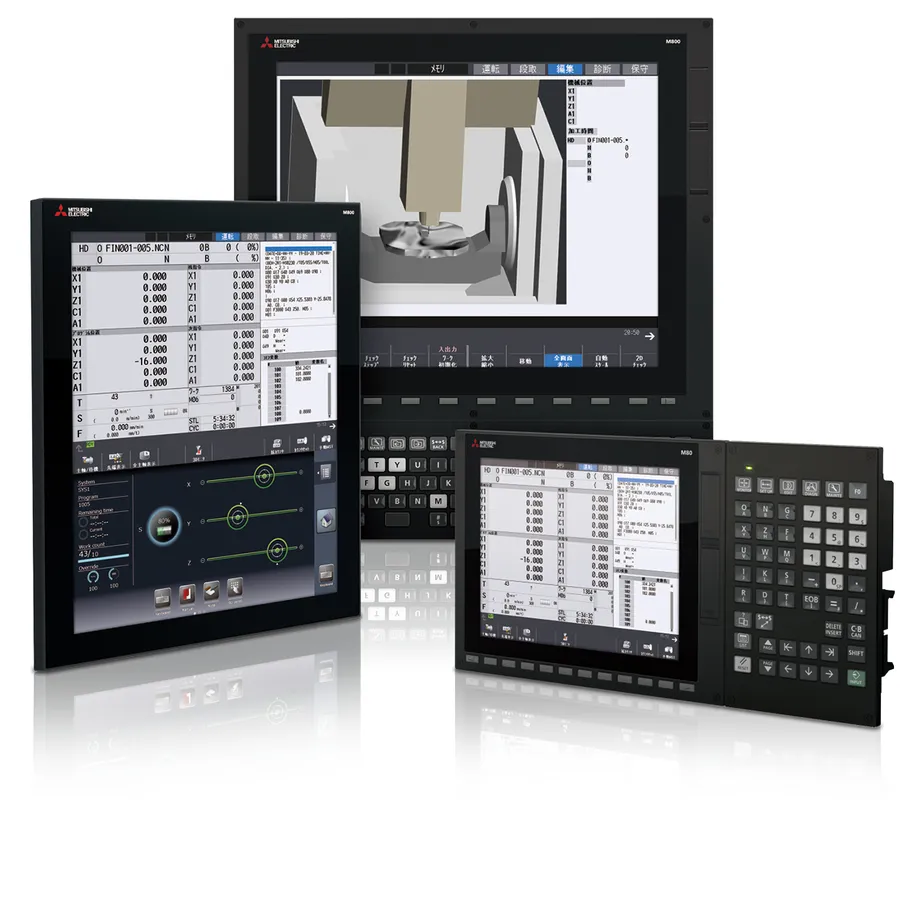
Mitsubishi Electric’s M80 and M800 families are FANUC’s strongest direct competitor, particularly in high-speed milling, machining centers and advanced turning. Mitsubishi’s notable approach is bundling generous standard packages — large internal memory, touch screens and surface-quality software — giving a strong price/performance balance.
But the model name alone is not enough here either. For machining centers, official data lists M80 TypeA at up to 11 total axes, 8 NC axes, 2 spindles, 4 simultaneous contouring axes and 2 part systems, while M80 TypeB offers up to 9 total axes, 5 NC axes, 2 spindles, 4 simultaneous axes and a single part system. So even “it has an M80” tells you little until you ask TypeA or TypeB.
Mitsubishi’s key weapon on the die/mold side is SSS — Super Smooth Surface control, currently in its SSS-4G generation. SSS-4G optimizes acceleration/deceleration according to axis characteristics, reduces vibration at high speed, and targets either higher accuracy in the same time or shorter cycle time at the same accuracy. When machinists say “Mitsubishi runs beautifully on molds”, this is usually the technical background. For hands-on settings, see our Mitsubishi M80 Mold Machining Settings: SSS Control and M700-M70 SSS Parameter Guide.
For serious die/mold, 5-axis, multitasking and complex OEM machines, the multi-CPU M800 family comes into play. To get familiar with an existing Mitsubishi control, our M70 Panel Keys and G-Codes Reference is a good companion.
Siemens SINUMERIK: More Than a Control
Simplified, the SINUMERIK family has three levels: 808D entry level, 828D mid/upper-range standard turning, milling and grinding machines, and 840D sl / SINUMERIK ONE for advanced and complex machines. Thanks to the ShopMill and ShopTurn dialog interfaces, an operator can create graphically guided programs at the machine without CAM software.
Is Siemens weak in mold machining? Absolutely not. The Advanced Surface and Top Surface algorithms were developed precisely for molds, free-form surfaces, dense CAM programs and high surface quality: they analyse NC blocks ahead, suppress jerk even with irregular point distribution, and optimize surface quality and machining time together. On 5-axis machines, kinematic functions such as CYCLE800 and TRAORI matter; for practical settings see our SINUMERIK CYCLE832 High Speed Settings guide.
What really sets SINUMERIK ONE apart is not raw CNC performance alone: Siemens combines CNC, automation, digital twin, virtual machine and production simulation in one ecosystem. With Create MyVirtualMachine / Run MyVirtualMachine, the machine and process can be modeled virtually — a major advantage for automotive, aerospace, complex automation lines and multi-axis mill-turn projects.
HEIDENHAIN: The Reference for Molds and Precision Milling
HEIDENHAIN is a category of its own in die/mold, prototype, precision milling, 5-axis and toolroom work. According to official data, TNC 640 and the new-generation TNC7 offer up to 24 control loops, 4 spindles and 0.5 ms block processing time, with functions such as TCPM, OCM, 3D tool compensation and dynamic collision monitoring. Algorithmically, ADP (Advanced Dynamic Prediction) pre-analyses dense, irregular CAM point data and smooths the acceleration profiles; with absolute linear encoders, closed-loop position control runs directly on scale feedback.
Another major HEIDENHAIN advantage is Klartext conversational programming: pockets, holes, contours, probing and plane operations can be created right at the machine without CAM. That is why the combination of “HEIDENHAIN + a mechanically excellent 5-axis machine” is so popular in mold and tool shops.
Mazak / MAZATROL: The Pioneer of Shop-Floor Programming
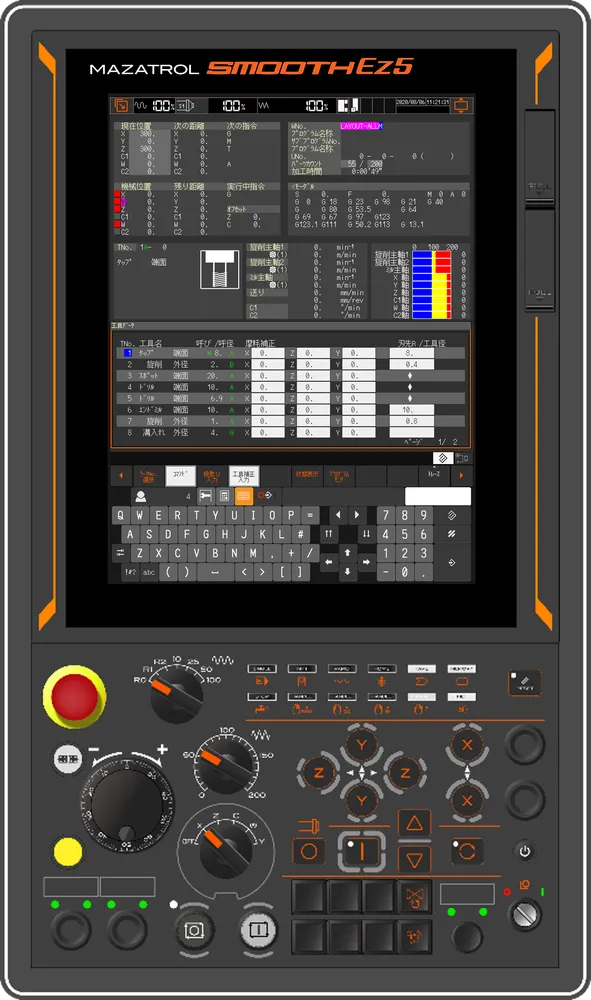
Let’s separate the names: Mazak is the machine builder; MAZATROL is Mazak’s conversational programming and control approach. Instead of writing G-code lines, the operator enters part diameter, stock, grooves, holes and finishing operations into dialog screens; the control calculates most of the cutting depths, passes, speeds and feeds itself. On live-tool lathes, twin-spindle and multi-turret turn-mill centers, MAZATROL radically cuts programming and setup times. The new-generation Smooth architecture combines that dialog convenience with high-speed 5-axis milling algorithms.
Another Mazak advantage: control, servo, spindle, kinematics and machine software all live in one manufacturer’s ecosystem — and Mazak maintains a direct technology center, engineering, spare parts and service organization in Turkey, which is not a small factor in a purchase decision.
Okuma OSP: Machine + Control from One Hand
Okuma also develops its own CNC control; the current top model is OSP-P500. OSP’s strength comes from tight integration with the machine’s mechanical and thermal behavior: Thermo-Friendly Concept (thermal stability), Collision Avoidance System, Machining Navi (chatter/cutting optimization) and 5-Axis Auto Tuning are examples. For precision turning, mill-turn and multitasking machines, Okuma absolutely belongs on the shortlist.
Haas: Simple, Practical, Operator-Friendly
The first name that comes to mind for “American control” is Haas. Haas develops its Next Generation Control (NGC) exclusively for its own machines, with a philosophy of making CNC as easy as possible for the operator. Ethernet, Wi-Fi, USB, visual programming guidance, advanced tool management and Safe Run are standard; current specifications list standard program execution at 1000 blocks/second. With the High-Speed Machining option active, acceleration profiles can be tuned via the P (smoothness) and E (corner tolerance) parameters.
But let’s repeat: 1000 blocks/second does not automatically mean the best mold surface. Haas is extremely practical for standard 3-axis parts, fixtures and general machine parts, hole-making, education, prototyping and standard turning. A user targeting top-level 5-axis mold surfaces should decide on the complete machine architecture, not on the control alone.
Hurco: Variable Look-Ahead up to 10,000 Blocks
Hurco holds a special position in job-shop manufacturing with its WinMAX control software and patented UltiMotion motion technology. Instead of classic hardware motion cards, UltiMotion uses software-based dynamic trajectory planning: as geometry gets complex it deepens look-ahead up to 10,000 blocks, then releases resources on straight sections. Its smoothed transitions on hole-to-hole moves reduce Z-axis stop-start motion and can cut cycle times noticeably. Merging ISO G-code with conversational steps in the same program (NC/Conversational Merge) is a major convenience for shops running small batches of frequently changing parts.
Fagor: The Flexible Player for Retrofits and Special Machines
Spain’s Fagor Automation develops CNC controls, servos and measurement systems together. The current 8058, 8060, 8065 and 8070 families scale from lathes and mills to large bridge-type machines and 5-axis applications; the industrial-PC-based 8065 supports up to 28 axes and 4 interpolation channels. For high-speed surface machining, the HSSA algorithms smooth the toolpath with spline curves. Fagor also offers a free CNC simulator — valuable for training and program verification. Treat Fagor not as a “budget clone” but as a genuine industrial CNC manufacturer with its own motion-control architecture, particularly strong in retrofit and special-machine projects.
GSK, Syntec and LNC: Don’t Underestimate the Budget Segment
The prejudice “Chinese/Taiwanese control = bad” is technically wrong. GSK no longer builds only simple 2-axis lathe controls: the current GSK 25i family targets 3–5 axis machining-center applications, and advanced turning systems reach configurations with 8 feed axes and 4 spindles. GSK’s biggest advantage is its cost/feature ratio, and since its G-code structure follows FANUC syntax, operator transition is easy.
Syntec appears more and more often in the Taiwan/China machine ecosystem and should no longer be dismissed as a router-only control: current series support simultaneous 5-axis, RTCP and EtherCAT. LNC covers a wide product range for turning, milling, grinding, routers and special machines, and is commonly integrated as standard equipment on budget OEM machines.
So why doesn’t everyone buy a budget control? Because a CNC decision is never hardware specs alone: service network, operator familiarity, CAM post processor support, documentation, spare parts, resale value and long-term software support all shape the total ownership experience. Two controls that look similar in a catalog may not feel similar on the shop floor.
Comparison Matrix: Look-Ahead, Algorithms and Target Use
The table below is compiled from typical values in manufacturer documentation; exact values depend on model, package and active options:
| Control | Origin | Typical Look-Ahead | Core Motion Algorithm | Programming | Best Fit |
|---|---|---|---|---|---|
| FANUC 0i-MF Plus (Std.) | Japan | ~400 blocks | AICC II, Fast Cycle Time | ISO G-code / iHMI, Manual Guide i | General parts, mass production |
| FANUC 0i-MF Plus (ADV pkg.) | Japan | ~1500 blocks | AICC II, Nano Interpolation, Smart Tolerance | ISO G-code / iHMI | Precision molds, high-speed milling |
| Siemens 828D | Germany | ~150–300 blocks | Advanced Surface, jerk limiting | G-code / ShopMill, ShopTurn | General machining, series parts |
| Siemens 840D sl / ONE | Germany | >1000 blocks | Top Surface, kinematic optimization | G-code / open PLC architecture | Complex molds, 5-axis, aerospace |
| HEIDENHAIN TNC 640 / TNC7 | Germany | >1000 blocks | ADP (Advanced Dynamic Prediction) | Klartext / ISO | High-precision molds, medical |
| Mitsubishi M80/M800 | Japan | High (package based) | SSS-4G (Super Smooth Surface) | ISO G-code / NAVI | Molds, general parts, multi-axis turning |
| Hurco WinMAX | USA | 10,000 blocks (variable) | UltiMotion (software based) | Conversational + NC merge | Job-shop, small fast batches |
| Haas NGC (HSM opt.) | USA | ~800 blocks | P/E parametric smoothing | ISO G-code / visual programming | General parts, contract work, education |
| Mazak MAZATROL Smooth | Japan | Dynamic variable | Smooth Velocity Control | MAZATROL dialog / ISO | Fast setup, complex turn-mill |
| Okuma OSP-P500 | Japan | High (package based) | Machining Navi, thermal integration | ISO / dialog | Precision turning, mill-turn, multitasking |
| Fagor 8065/8070 | Spain | >1000 blocks | HSSA I/II (spline) | ISO / IIP conversational | Bridge mills, retrofit, special machines |
| GSK 25i / 980 | China | ~30–100 blocks | Standard linear/circular acc. | ISO G-code (FANUC-like) | Budget lathes and 3-axis mills |
| Syntec 210/220 series | Taiwan | Medium–high | RTCP, 5-axis compensation | ISO G-code | Routers, VMCs, budget 5-axis |
| LNC | Taiwan | Medium | EtherCAT-based motion | ISO G-code | Budget OEM, special machines |
Which Controls to Shortlist for Which Job?
Use the table below not as a definitive ranking but as a “which families should I look at first” guide:
| Application | Shortlist First |
|---|---|
| Basic CNC lathe | FANUC / Mitsubishi / Haas / Siemens / GSK |
| Production turning | FANUC / Mitsubishi / Okuma / Mazak |
| Y-axis lathe, twin spindle + twin turret | FANUC 30i class / SINUMERIK ONE / Okuma / Mazak |
| Standard VMC (3–4 axis) | FANUC 0i-MF Plus / Mitsubishi M80 / Siemens 828D / Haas |
| Precision molds and 3D free-form surfaces | HEIDENHAIN / Mitsubishi / Siemens / high-end FANUC |
| Simultaneous 5-axis | HEIDENHAIN / Siemens / high-end FANUC / high-end Mitsubishi |
| Shop-floor programming at the machine | HEIDENHAIN Klartext / MAZATROL / ShopMill-ShopTurn / Hurco / Haas |
| Job-shop, small changing batches | Hurco / Mazak / Haas / Siemens |
| Retrofit and special machines | Fagor / Siemens / FANUC / Mitsubishi |
| Budget OEM machines | GSK / Syntec / LNC |
| Complex automation and digital twin | SINUMERIK ONE / FANUC / Mitsubishi |
The Control Alone Is Not Enough: Don’t Forget the Mechanics
Even the best control unit in the world cannot make a weak mechanical structure precise. Always evaluate the control choice together with these mechanical questions: Are the guideways box ways or linear guides (heavy cutting and rigidity vs. speed and precision)? Does the spindle power–torque curve match your material — how much torque at which rpm? What about bearing arrangement, cooling and thermal compensation? Are there linear scales and full closed-loop control on the axes? We covered all of this in CNC Machine Selection Part 2: Box Way or Linear?.
For practical numbers, use our free tools: check whether your cutting parameters fit the machine’s power with the CNC Spindle Torque Calculator and Machine Selection tool, and verify speeds and feeds with the CNC Speed and Feed Calculator. On the tooling side, our CNC Cutting Tool Selection Guide is the natural companion to this article.
20 Questions to Ask the Dealer Before You Buy
This is the most important section of this article. Before buying a CNC machine, request the following information from the dealer in writing:
- What is the exact brand and model of the CNC control? (Not “FANUC” but “FANUC 0i-MF Plus”; not “M80” but “M80 TypeA”)
- How many NC axes are active?
- How many axes can interpolate simultaneously? (A 5-axis machine and a 5-axis simultaneous machine are not the same thing)
- Is 3+2 machining supported?
- Is the simultaneous 5-axis license active?
- Is TCP / RTCP available? (FANUC TCP, Siemens TRAORI, Syntec RTCP)
- Is a High-Speed Machining package included? (FANUC Fine Surface / AICC, Mitsubishi SSS, Siemens Advanced/Top Surface)
- What are the look-ahead capacity and contour optimization features?
- How are large CAM programs executed? (A 5 MB program is one thing; a 500 MB mold program is another)
- How much CNC program memory is there?
- Can programs run over Ethernet/network (DNC performance)?
- What brand and resolution are the servo motors? (FANUC control + FANUC servo and FANUC control + another servo architecture may not be the same system)
- What are the spindle motor and spindle encoder system?
- Are linear scales fitted on the axes?
- Is full closed-loop control available?
- Is thermal compensation included?
- Is a tool measurement probe supported?
- Is a workpiece measurement probe supported?
- Is there a ready, tested post processor for your CAM system? (A bad post makes even the best control inefficient)
- Which control options are active, and which require an extra license?
Frequently Compared: Short Answers
FANUC or Mitsubishi?
For general production, service coverage and operator familiarity, FANUC is a very strong choice. For die/mold and high-speed milling, a well-configured Mitsubishi M80/M800 is a very strong rival. On machines of the same class, the decision is usually made not by the brand but by which options are switched on: a fully packaged Mitsubishi can outperform a stripped-down FANUC — and vice versa. FANUC options are often sold as separate software keys, while Mitsubishi tends to keep the standard package fuller in memory and surface software.
FANUC or Siemens?
FANUC represents the more classic CNC approach: universal G-code logic, a strong OEM ecosystem, mass production and simplicity. Siemens offers a broader automation approach: ShopMill/ShopTurn, CYCLE800, TRAORI, open PLC architecture, digital twin and advanced multi-axis support. On complex machines and automation integrations, the Siemens architecture can be a major advantage; on resale value and operator availability, FANUC leads.
FANUC or HEIDENHAIN?
Best compared by application: mass production, classic VMCs and general CNC → FANUC; molds, toolroom, 5-axis milling and shop-floor programming → HEIDENHAIN. This is not a quality ranking — it is an application-fit distinction.
Conclusion: The Decision Formula
There is no absolute “best brand” in CNC controls. In standard mass production, FANUC and Mitsubishi lead; in molds, precision surfaces and 5-axis, HEIDENHAIN, Siemens, Mitsubishi and high-end FANUC stand out; in turning and multitasking, Mazak, Okuma, FANUC, Mitsubishi and Siemens are strong; for fast programming at the machine, Klartext, MAZATROL, ShopMill/ShopTurn, Hurco and Haas shine; in the budget OEM segment, GSK, Syntec and LNC deserve consideration.
And the final decision is never made on the control brand alone:
CNC model + active software options + servo system + the machine’s mechanical structure + service support + the job to be done — evaluate these six together and the right control unit reveals itself.
Note: The axis counts, look-ahead capacities and function names in this article are compiled from typical values in the manufacturers’ official documentation; exact values vary by model, package and active options. Always request the current official configuration document before purchasing.