
G76 is the Haas lathe cycle that cuts a thread automatically in multiple passes. On a Haas it is written on one line: thread height K, first pass depth D and pitch F all go on the same block. This differs from the two-line format common on FANUC 0i lathes. For the general logic and FANUC format: G76 threading cycle.
Quick reference: how to write a Haas G76
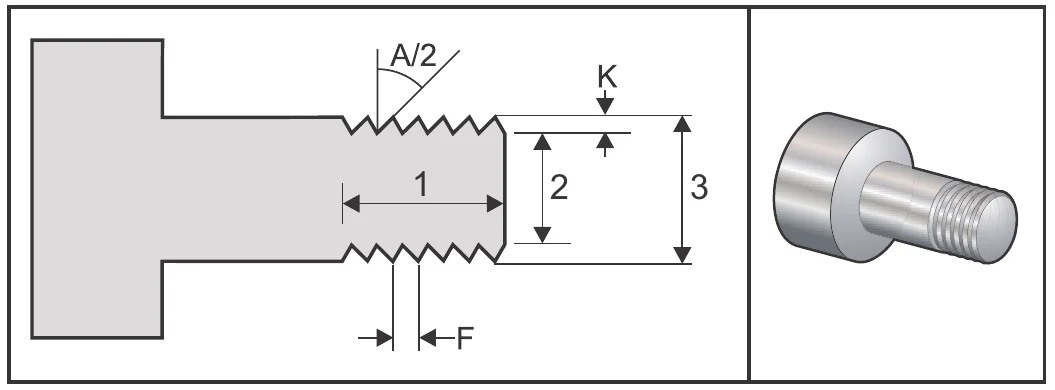
G76 X18.16 Z-25. K0.92 D0.25 F1.5 A59Addresses on the G76 line
| Address | Meaning |
|---|---|
| X | Thread root diameter (absolute) |
| Z | Thread length (absolute) |
| U, W | Incremental values instead of X and Z |
| K | Thread height, radius value |
| D | First pass depth |
| F (E) | Feed, the thread lead |
| A | Tool nose angle, 0–120 degrees, no decimal point; 0 if omitted |
| I | Taper amount, radius value |
| P | Infeed method (P1–P4) |
| Q | Thread start angle, no decimal point |
How are pass depths calculated?
The first pass is D. Each following pass follows the manual’s D × √N rule (N is the pass number), so passes get shallower. Two settings limit this:
- Thread minimum cut (Setting 99): no pass can be smaller than this value.
- Thread finish allowance: material left for the last pass. The G76 section of the manual calls it Setting 86, while the current settings list in the same manual lists it as Setting 289 – Thread Finish Allowance. Check which one your machine uses on the Settings page.
The calculated thread depth is K minus the finish allowance.
A and P: infeed angle and cutting method
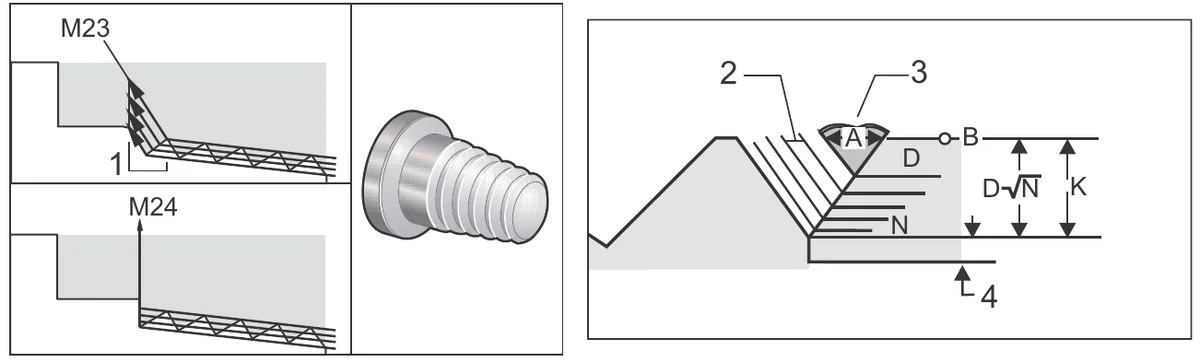
Without A the insert feeds straight in (radial). The manual recommends A59 on 60-degree threads to reduce chatter. P selects one of four methods:
| P | Method |
|---|---|
| P1 | Single edge cutting, constant cutting amount |
| P2 | Double edge cutting, constant cutting amount |
| P3 | Single edge cutting, constant cutting depth |
| P4 | Double edge cutting, constant cutting depth |
The manual says that, based on industry experience, P2 may give superior results. Note: P values are modal; a G04 P or M97 P used while the cycle is active also applies to the cycle.
Thread end chamfer: Settings 95, 96 and M23/M24
An optional chamfer pull-out is cut at the end of the thread. Setting 95 sets its size in number of threads (1.000 with a 1.5 pitch gives 1.5 mm), Setting 96 its angle. The manual gives defaults of 1.000 and 45 degrees. If the thread runs into a relief groove, the chamfer is not needed: set Setting 95 to 0.000 or use M24. M23 turns it back on.
Taper threads: I
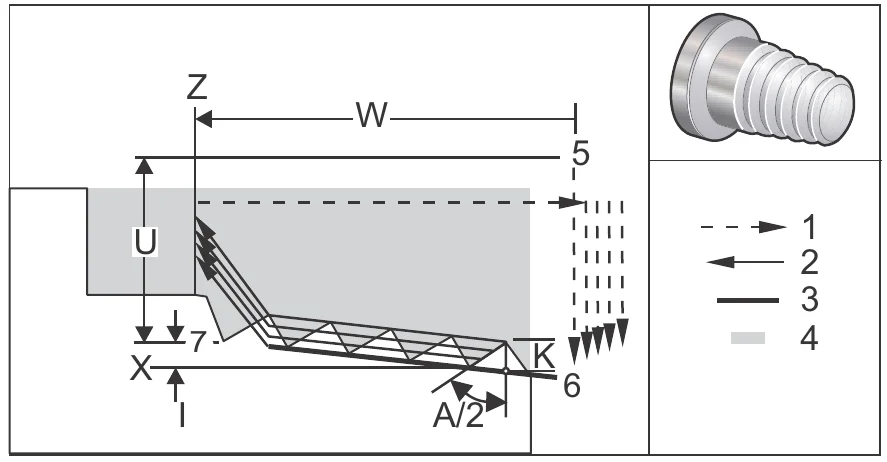
I is the radial difference between the target point (X, Z) and the start of the thread, not an angle. The manual notes a conventional O.D. taper thread has a negative I.
Metric example: M20 × 1.5 external thread
%
O01003 (HAAS G76 M20X1.5 THREAD - DIMENSIONS ARE EXAMPLES)
(G54 X0 SPINDLE CENTERLINE, Z0 FINISHED FACE)
(T3 = 60 DEGREE THREADING INSERT, SETTING 9 = MM)
(RELIEF GROOVE AT THREAD END: CHAMFER OFF WITH M24)
T303
G00 G18 G21 G40 G80 G99
G50 S2000
G97 S800 M03
G00 G54 X22. Z5.
M08
M24
G76 X18.16 Z-25. K0.92 D0.25 F1.5 A59
G00 G53 X0 M09
G53 Z0 M05
M30
%| Block | Explanation |
|---|---|
| G99 | Feed per revolution; the manual recommends G99 before a threading cycle |
| G97 S800 | Constant RPM; do not thread in constant surface speed (G96) |
| X22. Z5. | Start position outside the major diameter, in front of the face |
| M24 | Chamfer pull-out off because the thread ends in a groove |
| G76 X18.16 Z-25. K0.92 D0.25 F1.5 A59 | Root diameter 18.16, length 25 mm, thread height 0.92 (radius), first pass 0.25, pitch 1.5 |
The K value in the example is the commonly used approximation of 0.613 × pitch for an external metric thread; X = 20 − 2 × 0.92 = 18.16. Set the thread height from your thread standard and the insert maker’s table. To calculate: thread calculator.
Common mistakes
- Giving K as a diameter: K is a radius value.
- A with a decimal point (A59, not A59.).
- Threading in G96.
- Not cancelling tool nose compensation: the manual requires G40 before G76.
- Leaving the chamfer on with a relief groove: the pull-out can bring the insert close to the shoulder.
- Forgetting that P is modal.
FAQ
How do I cut an internal thread with Haas G76?
With the same cycle: X (root diameter) is larger than the start diameter, and the start point sits inside the bore. Check in graphics that the tool is positioned safely inside the bore at the start.
Is Haas G76 the same as FANUC G76?
No. The meaning of the addresses and the line structure differ. Do not run a FANUC G76 program on a Haas without converting it.
Safety notice and disclaimer
The program on this page is a training example and its dimensions are for illustration. Before running it on your machine, check the tool and work offsets, prove it out in graphics and run the first part in single block with reduced feed and rapid override. The same code can behave differently on different controls and software versions; the Haas operator’s manual always takes priority. Mentor CNC cannot be held responsible for damage or injury arising from the use of this information.
