
Estimated reading time: 7 minutes
What Will You Learn in This Lesson?
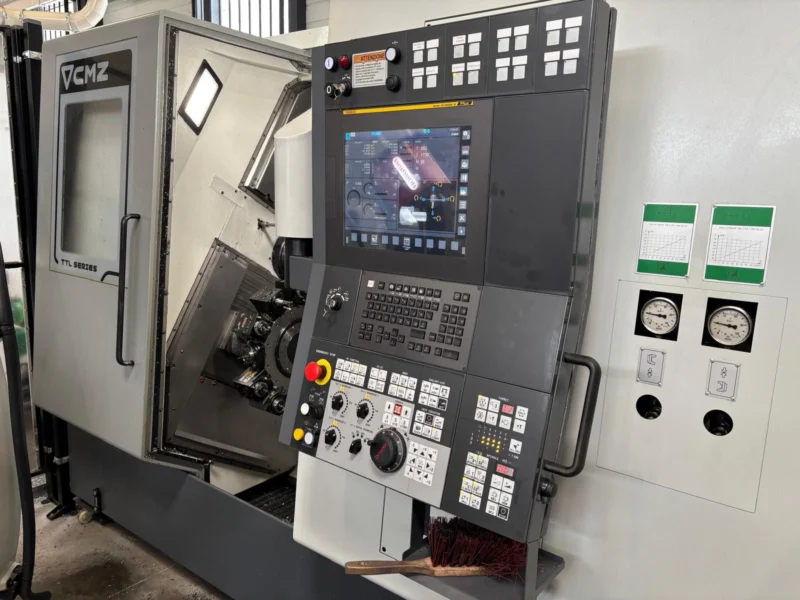
In this lesson you will learn the following functions on a FANUC control unit:
- MEMORY/AUTO mode,
- Cycle Start,
- Feed Hold,
- RESET,
- Single Block,
- Optional Stop,
- Block Skip,
- Feed Override,
- Rapid Override.
You will also examine how a program is started, held and stopped in a controlled way.
What Is Automatic Operation?
Automatic operation is the execution of the program selected in the CNC memory by the FANUC control, block by block.
This operating mode may be shown under the following names on different panels:
MEMORYMEMAUTOAUTOMATIC
Even though the names differ, the basic purpose is the same: to run the selected program in the memory.
During automatic operation the FANUC control:
- reads the program blocks in order,
- processes the G, M, S, T and F commands,
- executes the axis movements,
- displays the active program and sequence number,
- evaluates the stop and percentage adjustment commands coming from the operator panel,
- stops the operation appropriately if an alarm or a safety condition occurs.
Before Starting the Program
Running a program is not simply selecting MEMORY/AUTO mode and pressing the Cycle Start button.
At the very least, the following should be checked before starting:
- Is the correct O program selected?
- Is the program cursor on the correct start block?
- Does the machine hold the necessary reference data?
- Are the tool and offsets to be used correct?
- Has the correct workpiece coordinate been selected?
- Are the tool, part, chuck, fixture and table positions safe?
- Are the workpiece and the tool clamped correctly?
- Are the door and other safety conditions satisfied?
- What are the Single Block, Optional Stop and Block Skip selections?
- What value are the Feed Override and Rapid Override set to?
- Is there an alarm or an operator message on the screen?
- Have the direction and target position of the first movement been checked?
Using a low Rapid Override, a suitable Feed Override and Single Block on the first trial makes it easier to follow the movements. These controls do not make a faulty program safe; they only help the operator to watch the program in a more controlled way.
Cycle Start
Cycle Start is the button that starts the automatic execution of the selected program.
The button is mostly green and may carry:
CYCLE STARTSTART- a cycle start symbol.
For Cycle Start to work, the control and the machine must give the necessary permissions. For example:
- MEMORY/AUTO mode must be selected.
- A valid program must be selected.
- The CNC must not be in an alarm state.
- The emergency stop must not be engaged.
- The door and the safety interlocks must be in the correct state.
- The hydraulic, lubrication, air or clamping conditions determined by the machine tool builder must be satisfied.
If the program does not start when Cycle Start is pressed, instead of pressing the button again and again, the mode, alarms, messages and machine states on the screen should be checked.
What is watched after Cycle Start?
After the program starts, the operator should not look only at the physical machine movement. The following information should also be followed on the FANUC screen:
- The active O program
- The N sequence number being executed
- The ABS or ALL positions
- Distance To Go, the remaining movement if shown
- The active G codes
- The F feedrate value
- The S spindle value
- The T tool information
- The automatic operation status
An expression such as STRT or RUN on the screen may show that the program is being executed.
Feed Hold
Feed Hold is used to hold the progress of the program in a controlled way during automatic operation.
The button usually carries:
FEED HOLDHOLD- a feed hold symbol.
When Feed Hold is pressed, the axis feed decelerates and stops at a suitable point. The program is held where it stopped. When the conditions are suitable, operation can be continued with Cycle Start.
However, when Feed Hold is used:
- The spindle may not stop automatically.
- The coolant may continue to run.
- Some auxiliary functions may stay active.
- Synchronized movements such as threading or tapping may not stop immediately.
- Some cycles may continue to a safe intermediate point.
This behavior depends on the control function and on the configuration of the machine tool builder.
Caution: Feed Hold does not make the machine de-energized or completely safe. Using Feed Hold alone is not enough for working inside the machine.
RESET
RESET is the basic control key used to reset or end the operation the CNC is carrying out.
RESET can be used in the following situations:
- To cancel automatic operation
- To clear a suitable CNC alarm
- To end an MDI entry or a particular operation
- To put the CNC into the reset state
- To stop program execution
It should not be assumed that the program will safely continue from the same point after RESET.
When RESET is applied:
- Automatic operation may end.
- Some modal states may return to the reset state of the control.
- Some M, S or T functions may behave differently depending on the machine tool builder.
- The spindle or the coolant may stop on some machines, while on others a separate control may be needed.
- The program cursor may not automatically return to the start of the program on every control.
Before continuing, the active G codes, the tool, the offsets, the coordinates and the program position should be checked again.
The difference between RESET and Feed Hold
- Feed Hold: holds the program temporarily; under suitable conditions it can be continued with Cycle Start.
- RESET: resets or cancels the operation being carried out; the program state should be evaluated again before restarting.
Feed Hold can be used for a normal short pause and RESET to cancel the operation. In a dangerous situation, the emergency stop procedure of the machine is applied.
Single Block
Single Block allows the program to be executed block by block in a controlled way.
While the function is on:
- Cycle Start is pressed.
- The control executes one program block.
- When the block is completed, automatic operation waits.
- Cycle Start is pressed again for the next block.
This function is useful for:
- checking a new program,
- examining edited blocks,
- watching a tool change,
- verifying the targets of axis movements,
- running a program for the first time in a controlled way.
Does Single Block stop every physical movement one by one?
Not always.
A single program block may contain:
- more than one machine operation,
- a fixed cycle,
- a custom macro,
- an auxiliary movement belonging to the machine tool builder.
The control may stop after completing all the operations inside that block.
In some synchronized operations the Single Block stop may be temporarily inhibited or postponed to a safe point.
Common mistake: thinking that every movement in the program is automatically safe because Single Block is on. The whole of the next block should be read before pressing Cycle Start.
Optional Stop
Optional Stop allows the M01 command in the program to be activated or ignored by the operator.
On the panel it may be shown as:
OPTIONAL STOPOPT STOPM01
While Optional Stop is on
When the control reaches the block containing M01, the program stops. After the necessary checks have been made, Cycle Start is pressed to continue.
While Optional Stop is off
The control continues with the program without waiting at the M01 command.
Optional Stop can be used for the following purposes:
- Checking the part or the tool
- Examining the chip condition
- Getting operator confirmation before a particular operation
- Carrying out a first part inspection
M00 and M01 are not the same:
M00: a programmed unconditional stop.M01: applied only while the Optional Stop selection is on.
It is recommended that the Optional Stop selection be made before the program starts. Some controls may not evaluate a change of selection immediately during a running program.
Block Skip
Block Skip allows blocks with a / character at the beginning of the program line to be skipped.
Example:
/N120 M01;When Block Skip is on, this block can be passed without being executed. When Block Skip is off, the block is processed normally.
On the panel it may be found under the following names:
BLOCK SKIPBLOCK DELETE/BDT
Even though the name “Block Delete” is used, the program line is not deleted from the CNC memory. It is only skipped during automatic operation.
On some FANUC controls there may be multiple block skip options such as /1 and /2. These depend on the option and the machine configuration.
Caution: Block Skip should not be used as a safety function. Part clamping, tool safety or collision prevention should not be left to the skip switch alone.
Feed Override
Feed Override allows the programmed feedrate to be adjusted as a percentage by the operator.
For example, if the program contains:
F200then when Feed Override 50% is selected, a suitable feed movement is carried out at approximately half of the programmed value.
Values such as the following are usually found on the panel:
0%25%50%100%120%
Feed Override can be used to:
- reduce the feed during the first program check,
- follow the movements more comfortably,
- make the operator correction permitted during machining.
However, not every movement is affected by Feed Override. In threading, rigid tapping, some synchronized cycles or the builder’s special functions, the percentage adjustment may be limited or disabled.
The 0% position of Feed Override may hold the feed on some machines. It should not be assumed that this stops all movements safely.
Rapid Override
Rapid Override adjusts the percentage speed of rapid movements.
The following options are commonly found on the panel:
F025%50%100%
Rapid Override makes it easier to watch the rapid approach movements, particularly during the first check of a program.
F0 may not mean zero movement. It is generally a low rapid movement level determined by the machine tool builder.
Feed Override and Rapid Override have different tasks:
- Feed Override affects programmed feed movements.
- Rapid Override affects rapid movements.
A single percentage setting should not be relied on without knowing which G code the program is moving with.
An Example of Starting a Program Under Control
The following order can be applied during the first check of a new or edited program:
- Call the correct program.
- Read the beginning of the program and the first movements.
- Check the tools and the offsets.
- Select MEMORY/AUTO mode.
- Switch Single Block on.
- Check the Optional Stop and Block Skip states.
- Set the Rapid Override to a low value.
- Set the Feed Override to a suitably low value.
- Open the position screen.
- Press Cycle Start once.
- Watch the block being executed and the machine movement.
- Read the next block before the next Cycle Start.
If an unexpected situation occurs, Feed Hold, RESET or the emergency stop procedure should be used according to the nature of the movement.
Common Mistakes
- Pressing Cycle Start while the wrong O program is selected
- Starting from the middle of the program without checking the modal states
- Thinking the machine is completely safe after Feed Hold
- Pressing Cycle Start directly after RESET
- Not reading the next block while Single Block is on
- Confusing Optional Stop with M00
- Not checking the Block Skip selection
- Assuming that F0 is zero speed
- Thinking that Feed Override affects all movements
FANUC Note
The Cycle Start, Feed Hold and Emergency Stop buttons are on the machine operator panel. The Single Block, Optional Stop and Block Skip controls may take the form of a physical switch, an illuminated button or a software operator panel on the screen.
On controls such as FANUC 0-T, 0-TC, 0-M, 16/18/21, 0i-TC, 0i-MB, 0i-TF and 0i-MF the basic operating logic is similar. The location of the buttons and some behaviors may differ according to the PMC and safety configuration of the machine tool builder.
Short Summary
- MEMORY/AUTO mode runs the program selected in the CNC memory.
- Cycle Start starts program execution or resumes held operation.
- Feed Hold holds the program temporarily but does not make the machine completely safe.
- RESET resets or cancels the operation being carried out.
- Single Block allows the program to be checked block by block.
- While Optional Stop is on, the
M01command stops the program. - While Block Skip is on, suitable blocks beginning with
/are skipped. - Feed Override adjusts the feed percentage, Rapid Override the rapid movement percentage.
- F0 may not mean zero speed.
- Before a program is run, the program, position, offsets and panel selections should be verified.
Test Yourself
- If the program does not start when Cycle Start is pressed, which conditions should be checked?
- What is the basic difference between Feed Hold and RESET?
- Do the spindle and the coolant always stop after Feed Hold?
- Why may Single Block not stop every physical movement separately?
- What is the difference between
M00andM01? - Does Block Skip delete the program line from the CNC memory?
- Which movements do Feed Override and Rapid Override affect?
- Why should the F0 option not be accepted as zero speed?
- Why should Cycle Start not be pressed directly after RESET?
- Which operator selections can be used during the first check of a program?