
G150 is the Haas mill general purpose pocket milling code for pockets whose shape is defined in a subprogram. G12/G13 are enough for round pockets; rectangular, slotted or rounded-corner free-form pockets use G150. The shape is written as a closed contour in a separate subprogram, and G150 clears the inside and takes a finish pass around the edge.
Addresses on the G150 line
| Address | Meaning |
|---|---|
| P | Number of the subprogram that defines the pocket geometry |
| X, Y | Starting hole position (can be left out if already there) |
| Z | Final pocket depth |
| Q | Z depth per pass, starting from the R plane (positive) |
| R | R plane |
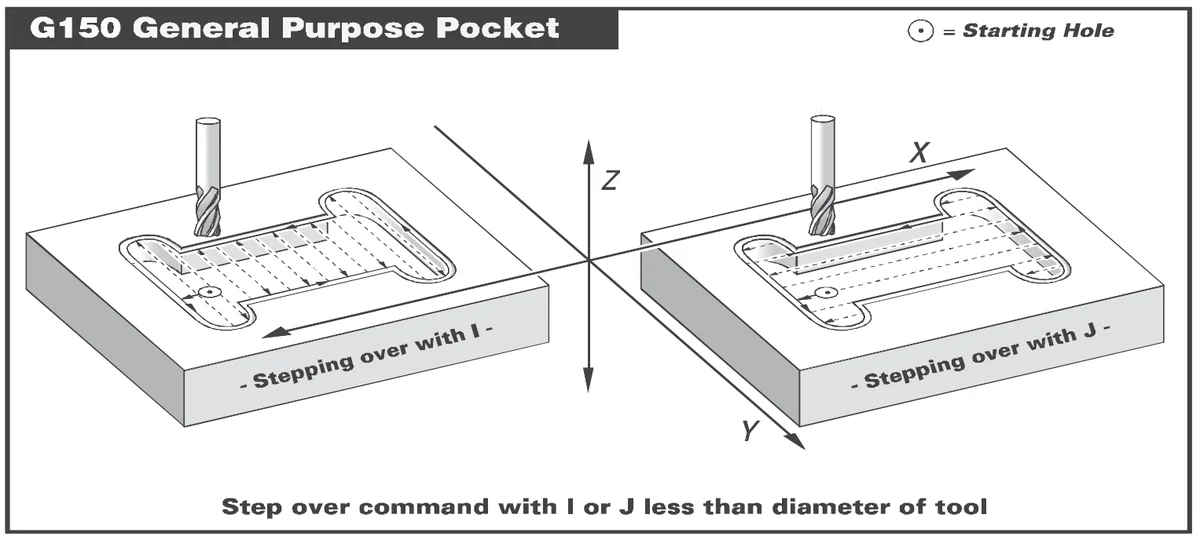
| I | Step-over in X; strokes run along Y |
| J | Step-over in Y; strokes run along X |
| K | Side finish allowance (positive) |
| G41 / G42 | Cutter compensation left / right of the programmed path |
| D | Offset number holding the cutter size |
| F | Feed rate |
Use only one of I or J, never both. The step-over must be smaller than the cutter diameter.
How to write the subprogram
- The subprogram is a separate program in memory and ends with M99. It cannot sit after the main program’s M30 the way an M97 local subprogram does.
- The geometry must be a closed loop of G01, G02 and G03 moves. G90 and G91 may be used.
- Codes other than G, I, J, R, X and Y are ignored in the subprogram.
- The first move goes from the start point onto the side of the pocket. The last move closes the loop at that same side point; do not program a move back to the start point.
- For climb cutting with G41, write the contour counterclockwise; clockwise with G42 gives conventional cutting.
- Per the workbook, the pocket geometry can have at most 40 moves (20 on older software).
Q and R: Q is required even for one pass
Q must always be given. Depth passes start from the R plane and step down by Q. With R2 and Z-10, the total plunge is 12 mm, so Q6 gives two equal passes and Q12 gives one. K is a side allowance only; there is no floor finish pass.
Starting hole
The end mill plunges straight down in G150, so drill a starting hole first. The start point must be inside the contour, and the plunge must not overlap any line of the contour. The manual warns that a start point outside the closed shape can cause Alarm 370 – Pocket Definition Error.
Metric example: 60 × 40 mm pocket, R8 corners
Main program:
%
O03001 (HAAS G150 POCKET - DIMENSIONS ARE EXAMPLES)
(G54 X0 Y0 POCKET CENTER, Z0 TOP FACE, SETTING 9 = MM)
(T1 = 12 MM DRILL, T2 = 10 MM END MILL, D02 = 10 MM)
T1 M06
G00 G90 G17 G40 G49 G54
X0. Y0.
S1200 M03
G43 H01 Z25. M08
G83 G99 Z-12. Q4. R2. F120.
G80 G00 Z25. M09
G53 G49 Z0. M05
T2 M06
G00 G90 G17 G40 G49 G54
X0. Y0.
S3200 M03
G43 H02 Z25. M08
G01 Z2. F1000.
G150 P3002 X0. Y0. Z-10. Q6. R2. I6. K0.3 G41 D02 F400.
G40 G01 X0. Y0.
G00 Z25. M09
G53 G49 Z0. M05
M30
%
Pocket geometry subprogram:
%
O03002 (G150 POCKET GEOMETRY 60 X 40, R8 CORNERS)
G01 X30.
Y12.
G03 X22. Y20. R8.
G01 X-22.
G03 X-30. Y12. R8.
G01 Y-12.
G03 X-22. Y-20. R8.
G01 X22.
G03 X30. Y-12. R8.
G01 Y0.
M99
%| Block | Explanation |
|---|---|
| G83 … Z-12. | T1 drills the starting hole at the pocket center |
| G150 P3002 … | Clears the O03002 shape to 10 mm depth in two passes (Q6), stepping 6 mm in X (I6), leaving 0.3 mm on the walls for the finish pass |
| G40 G01 X0. Y0. | Cancels compensation and returns to the start point |
| O03002 first line G01 X30. | Move from the center onto the right wall |
| O03002 last line G01 Y0. | Loop closes at X30 Y0, where it started on the wall |
The R8 corner radius is larger than the 5 mm cutter radius; an inside corner smaller than the tool radius cannot be machined with compensation.
Finding errors
If you get an alarm on the G150 line, the manual suggests running the subprogram on its own in graphics to find the bad move faster. Add a temporary G01 and feed at the top of the subprogram for this, then remove it.
Common mistakes
- Writing I and J together, or a step-over larger than the cutter.
- Leaving out Q, or calculating it from Z0 instead of R.
- Returning to the start point at the end of the subprogram.
- Plunging without a starting hole.
- Entering and leaving an island at the same point: the workbook notes this leaves a scallop the size of the offset radius; overlap entry and exit by a little more than the offset.
FAQ
Can G150 cut a round pocket?
Yes, but Haas G12 and G13 do it in one line.
Can I leave an island inside the pocket?
Yes. Per the workbook, the island is defined in the same subprogram and the 40-move limit covers pocket and island together. Reverse the cutting direction on the island relative to the pocket contour.
Safety notice and disclaimer
The program on this page is a training example and its dimensions are for illustration. Before running it on your machine, check the tool and work offsets, prove it out in graphics and run the first part in single block with reduced feed and rapid override. The same code can behave differently on different controls and software versions; the Haas operator’s manual always takes priority. Mentor CNC cannot be held responsible for damage or injury arising from the use of this information.
