
Instead of writing the X-Y position of every hole in a flange, a Haas mill lets you define the hole pattern in one line. There are three codes: G70 spaces holes evenly around a circle, G71 places them on an arc, and G72 lines them up along an angle. These codes do not drill by themselves; the active canned cycle (G81, G83, G84 and so on) does the drilling.
Note: Haas mill G70, G71 and G72 are not the same as the lathe G70 (finishing) and G71 (roughing) cycles. For the lathe side: Haas lathe G71 and G70.
How are the angles measured?
Angles start from three o’clock (the X+ direction) and run counterclockwise, from 0 to 360 degrees. A minus sign reverses the direction to clockwise. The workbook stresses using a decimal point on angle values (for example J10.).
G70: bolt hole circle
| Address | Meaning |
|---|---|
| I | Radius of the bolt hole circle |
| J | Angle of the first hole from three o’clock |
| L | Number of evenly spaced holes |
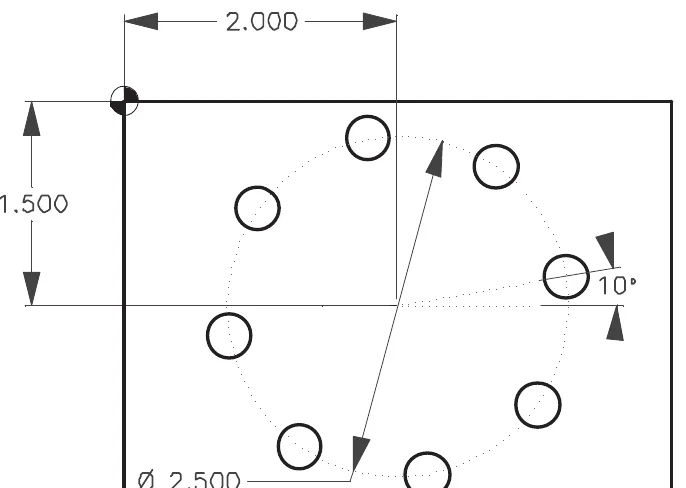
The tool must first be positioned at the center of the circle, on the previous line or with X-Y on the G70 line.
G71: bolt hole arc
| Address | Meaning |
|---|---|
| I | Radius of the arc |
| J | Angle of the first hole from three o’clock |
| K | Angle between holes (+ counterclockwise, − clockwise) |
| L | Number of holes |
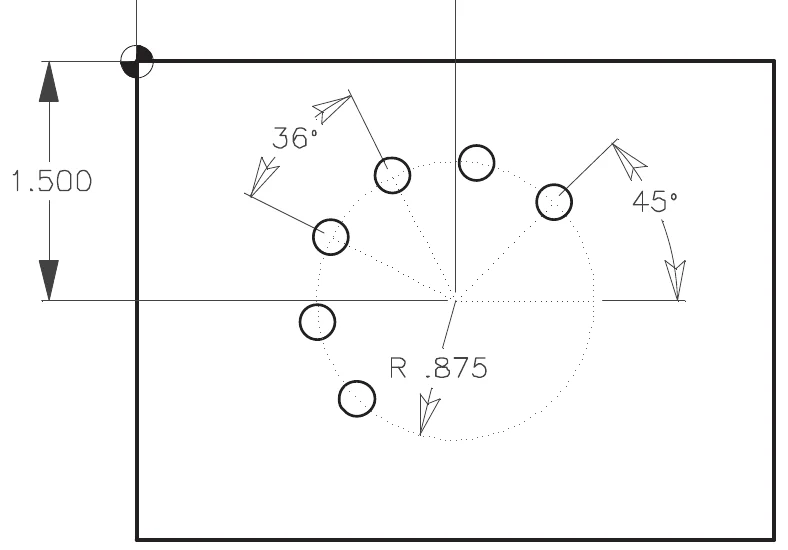
G72: holes along an angle
| Address | Meaning |
|---|---|
| I | Distance between holes |
| J | Angle of the line from three o’clock |
| L | Number of holes |
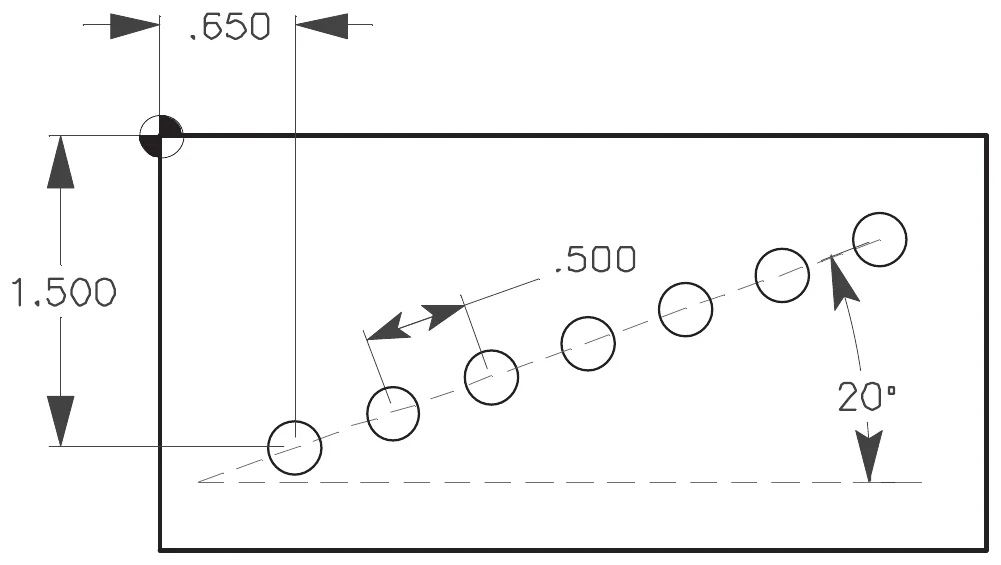
Check in graphics where the first hole lands before running the program.
Skipping the center hole: L0
If the canned cycle is defined while the tool sits at the circle center, the cycle drills a hole there too. Two ways to prevent it:
- Put L0 on the cycle line: no hole is drilled on that line and the control waits for the G70 on the next one.
- Put the cycle and G70 on the same line.
Metric example: 6 holes on a 60 mm pitch circle
%
O02003 (HAAS G70 BOLT HOLE CIRCLE - DIMENSIONS ARE EXAMPLES)
(G54 X0 Y0 LOWER LEFT CORNER, Z0 TOP FACE, SETTING 9 = MM)
(T3 = 8.5 MM DRILL)
T3 M06
G00 G90 G17 G40 G49 G54
X50. Y40.
S1800 M03
G43 H03 Z25. M08
G81 G99 Z-15. R2. F150. L0
G70 I30. J0. L6
G80 G00 Z25. M09
G53 G49 Z0. M05
M30
%| Block | Explanation |
|---|---|
| X50. Y40. | Tool goes to the center of the bolt circle |
| G81 G99 Z-15. R2. F150. L0 | Drilling cycle is defined; L0 means no hole at the center |
| G70 I30. J0. L6 | Six holes 60 degrees apart on a 30 mm radius (60 mm pitch circle), the first at three o’clock |
| G80 | Cancels the cycle |
Use G83 instead of G81 for deep holes: Haas G83 peck drilling cycle.
Common mistakes
- Writing G70/G71/G72 with no active canned cycle: the pattern is defined but nothing is drilled.
- An unwanted hole at the center: L0 was left out.
- Angles without a decimal point.
- Putting the diameter in I: in G70 and G71, I is a radius.
- Confusing them with the lathe G70/G71.
FAQ
Can G70 be used for tapping?
Yes. The pattern codes repeat the active cycle at every hole; if G84 is active, each hole is tapped.
Can the holes go clockwise?
Yes, give the J angle, or the K spacing in G71, a minus sign.
Safety notice and disclaimer
The program on this page is a training example and its dimensions are for illustration. Before running it on your machine, check the tool and work offsets, prove it out in graphics and run the first part in single block with reduced feed and rapid override. The same code can behave differently on different controls and software versions; the Haas operator’s manual always takes priority. Mentor CNC cannot be held responsible for damage or injury arising from the use of this information.
